

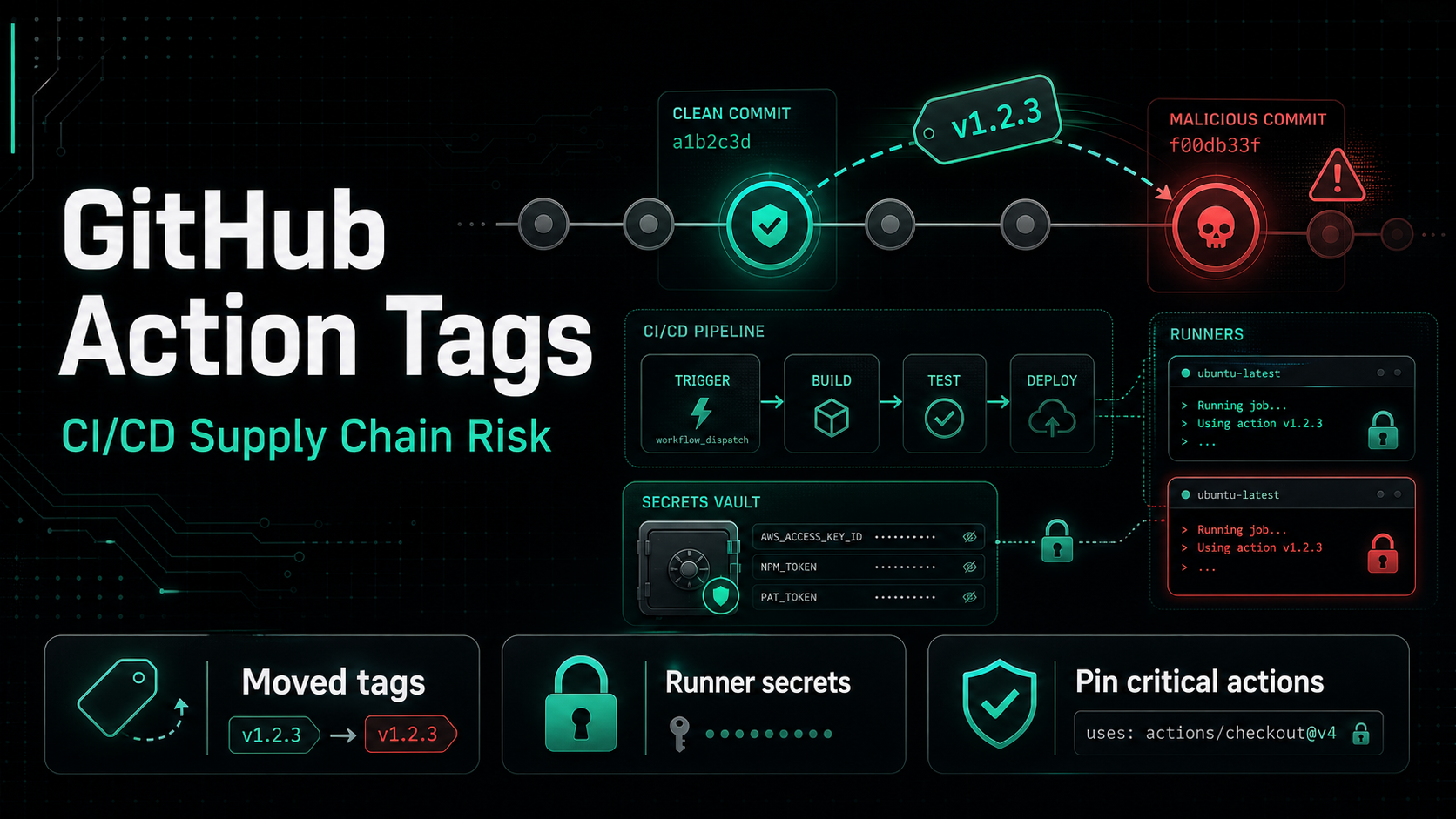
On June 24, 2026, the codfish/semantic-release-action GitHub Action was compromised in a way that should make every engineering team review how it pins CI/CD dependencies. According to Aikido’s incident write-up, an attacker force-pushed malicious commits into the repository and repointed sixteen release tags, including floating major tags such as v2, v3, v4, and v5.
That means workflows referencing those tags would resolve to the attacker’s code the next time they ran. The scary part is not just that one action was compromised. It is that GitHub Actions are often treated as configuration, while they actually execute code inside environments full of source-control tokens, release credentials, cloud secrets, and package-publishing access.
What happened
Aikido reports that the attacker used an “imposter commit” approach against codfish/semantic-release-action. Two malicious commits were pushed and then tags were moved to point at them. The first malicious commit picked up fifteen tags, including the entire v3 line, the v4 tags, and v5/v5.0.0; a second malicious commit took the v2 tag.
GitHub Actions resolves a tag when a workflow runs. If a workflow says:
- uses: codfish/semantic-release-action@v5then the runner does not remember what v5 meant when you reviewed the workflow. It asks GitHub what v5 means at execution time. If the tag has moved, the workflow runs different code.
Aikido says the malicious commits were not ancestors of the repository’s main branch. They were grafted in as orphaned commits and dressed up to look less suspicious in a quick history review. One reused the author identity, date, and commit message from a legitimate 2023 merge commit, while swapping the file contents for the malicious payload.
The action still worked — that was the trick
The compromised version did not simply break the workflow. It changed action.yml from a Docker-based action into a composite action.
The composite action first called the real codfish/semantic-release-action, pinned to a clean commit, so the expected release behavior still happened. Then it installed Bun through oven-sh/setup-bun and ran an obfuscated index.js payload with bun run.
That design matters. If a compromised action fails loudly, teams investigate. If it continues releasing packages successfully while a hidden cleanup step executes afterward, the compromise can survive much longer.
Aikido’s analysis says the injected index.js was a 781 KB obfuscated JavaScript file. The payload contained the marker string thebeautifulsnadsoftime, which Aikido connects to the Miasma credential-stealing toolkit. The report also notes that Miasma-style payloads can use GitHub public commit search as a dead-drop channel, avoiding a traditional command-and-control server.
Why this matters for CI/CD security
Most dependency security programs start with application packages: npm libraries, PyPI modules, container images, or OS packages. That is necessary, but it is not enough. CI/CD workflows have their own dependency graph:
- GitHub Actions referenced with
uses: - reusable workflows
- install scripts downloaded with
curl | sh - package managers and build tools installed at runtime
- release tooling with publish credentials
- custom shell scripts shared across repositories
Every item in that graph can become a code-execution path inside your runner.
Release automation is especially sensitive. A semantic-release workflow commonly has access to GITHUB_TOKEN, npm publish tokens, changelog permissions, repository write access, and sometimes cloud deployment credentials. A malicious action in that location does not need a remote exploit. It is already running where the secrets are.
Floating tags are convenient, not immutable
The codfish incident is a clean reminder that @v5 is a trust decision, not a fixed artifact. Floating tags are popular because they make updates easy: when maintainers publish a patched v5, users get it automatically. But that same property means users also automatically get a malicious v5 if the tag is moved.
There are three common pinning levels:
# Most convenient, least immutable
uses: owner/action@v1

# Better auditability, still movable unless the tag is protected
uses: owner/action@v1.2.3

# Immutable reference to one exact commit
uses: owner/action@8f9a58f2acdc190c356f79159b5de2548cdb63cd
Full commit SHA pinning is the strongest integrity control because the referenced code cannot change without changing the workflow file. It does make updates more manual, so many teams choose a middle ground: allow major tags for low-risk actions, require SHA pinning for actions that touch secrets or publish artifacts, and use automation to raise update PRs.
The key is to make that a conscious policy instead of an accident.
How to check whether you are affected
Start by searching your workflows for the affected action:
grep -R "codfish/semantic-release-action" .github/workflowsThen check whether any workflow used the tags Aikido listed as affected:
codfish/semantic-release-action@v2codfish/semantic-release-action@v2.2.1codfish/semantic-release-action@v3throughv3.5.0codfish/semantic-release-action@v4,v4.0.0,v4.0.1codfish/semantic-release-action@v5,v5.0.0
Aikido lists these as confirmed clean in its report:
codfish/semantic-release-action@v1.0.0throughv1.10.0codfish/semantic-release-action@v2.0.0
If an affected workflow ran after the compromise window, treat the runner environment as potentially exposed. Review logs for suspicious post-release steps, rotate publish tokens, rotate repository and package-registry credentials, and inspect any releases produced during the window.
Useful indicators from Aikido’s report include:
- malicious commit
5792aba0e2180b9b80b77644370a6889d5817456 - malicious commit
bcb6b1d409144318e8fad2171d6fe06d02299d1a - payload hash
9f93d77d32833a515bc406c46da477142bb1ac2babeecb6aa42f98669a6db015 - dead-drop marker string
thebeautifulsnadsoftime - unexpected use of
oven-sh/setup-bun@0c5077e51419868618aeaa5fe8019c62421857d6
What to do next
First, inventory your CI/CD dependencies. Treat .github/workflows/*.yml as production dependency manifests. Record every third-party action, reusable workflow, install script, and release tool that runs with secrets.
Second, tighten workflow permissions. Most workflows do not need broad write access. Set default permissions to read-only and grant write permissions only to the job that actually needs them:
permissions:
  contents: read
Then add scoped permissions at the job level for publishing or releases.
Third, pin high-risk actions more strictly. Anything that can read secrets, publish packages, create releases, deploy infrastructure, or write to the repository deserves stronger pinning and review. For those actions, prefer full commit SHAs or immutable release tags backed by branch/tag protection.
Fourth, reduce blast radius. Use environment-specific secrets, short-lived tokens, project-scoped API keys, and separate release credentials per repository or package. A compromised CI job should not become an organization-wide credential spill.
Finally, include CI/CD in your incident response model. SBOMs and dependency inventories help you understand what your application ships, but the build system that creates those artifacts is also part of the supply chain. You need to know which workflows ran, which actions they used, which secrets were available, and which artifacts they published.
If your pipeline already generates CycloneDX files, boring.tools can ingest them without connecting your Git provider. See the CI/CD SBOM upload guide for the GitHub Action, GitLab CI, Forgejo Actions, and raw curl examples.
boring.tools helps teams understand and monitor software supply-chain exposure across projects. If your CI/CD pipeline generates SBOMs, you can now upload them directly with boring-tools/upload-sbom-action and keep dependency visibility even when your repositories stay inside your own build system.