


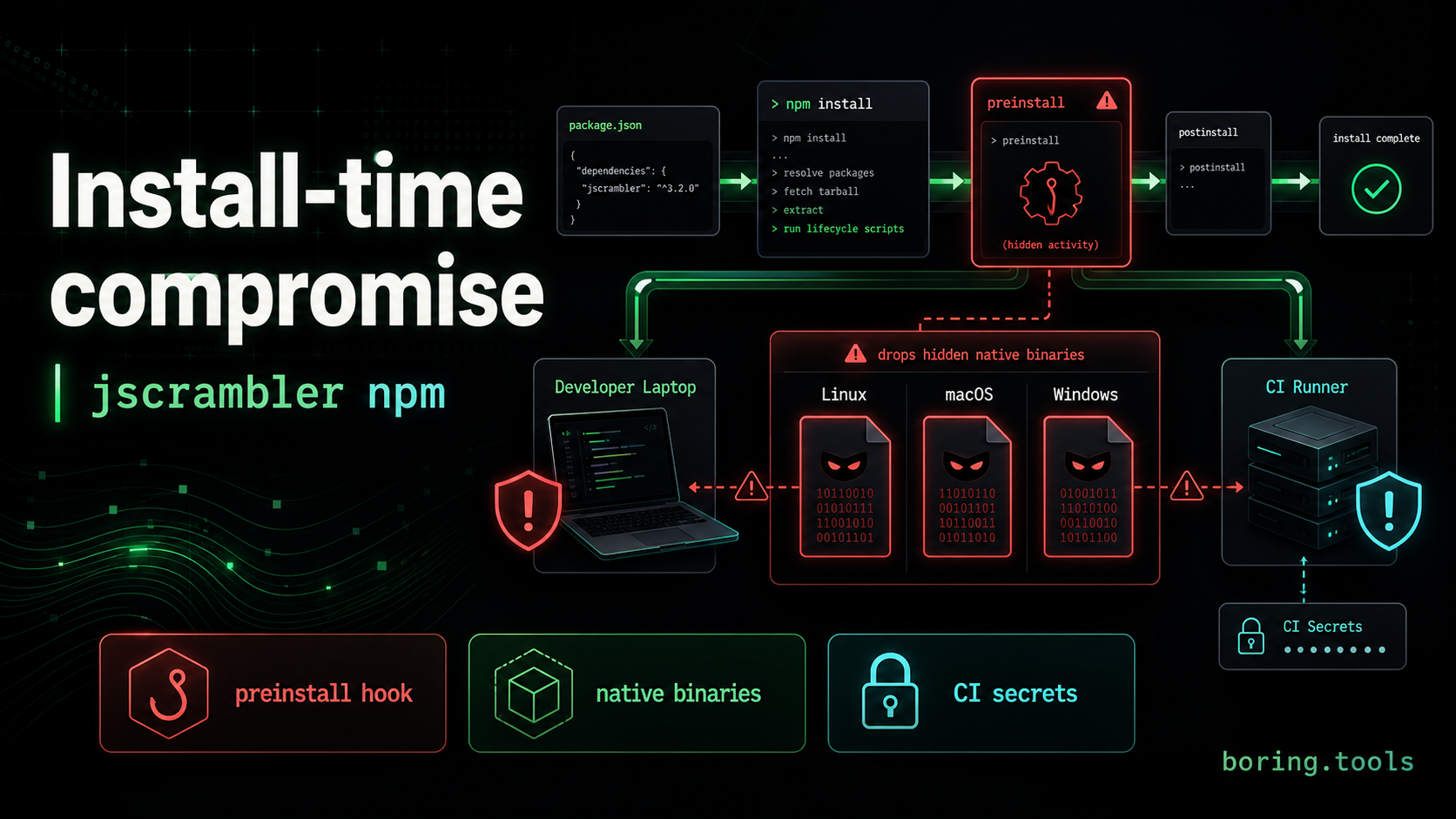
A package install is not a passive operation. It can execute code before your application imports anything, before a developer opens an editor, and before a CI job reaches its first build step.
The compromised jscrambler npm package is a sharp reminder of that boundary. According to Socket, version 8.14.0 of the package was published on July 11, 2026 with a new undocumented preinstall hook. Installing the package was enough to execute hidden native binaries for Linux, macOS, or Windows.
That makes this incident a useful follow-up to npm 12’s new install-time defaults. npm is moving lifecycle scripts toward explicit approval because install-time code execution is one of the cleanest paths from dependency compromise to developer and CI credential theft.
What happened
jscrambler is the official CLI client for Jscrambler’s Code Integrity API. It is the kind of tool teams might install as a development dependency or run inside a production build pipeline.
Multiple researchers reported that the malicious 8.14.0 release changed that install path in dangerous ways. Socket’s analysis says the release added a preinstall hook that invokes dist/setup.js, plus new files such as dist/setup.js and dist/intro.js that were not present in the previous 8.13.0 release.
The package did not just add suspicious JavaScript. StepSecurity reported that dist/intro.js was not really JavaScript at all. It was a custom binary container holding three gzip-compressed native executables: one for Linux, one for Windows, and one for macOS.
On install, the loader selected the right binary for the host operating system, decompressed it into a randomly named file in the system temp directory, marked it executable, and launched it detached from the npm install process.
Socket says it detected and flagged the compromised version six minutes after publication. The package has roughly 15,800 weekly downloads, but the number of environments that pulled the malicious version is not yet publicly known.
Why this matters
The dangerous part is not only that malware was published to npm. The dangerous part is when the malware ran.
A malicious preinstall hook executes during installation. That means users do not need to import jscrambler, run the Jscrambler CLI, or ship an application containing the package. If a developer laptop or CI runner installed jscrambler@8.14.0, the payload already had a chance to run with whatever access the npm process had.
That access can be broad:
- source code checked out for the build,
- environment variables available to CI,
- package registry credentials,
- cloud credentials,
- deployment tokens,
- browser and developer-tool state on workstations,
- local configuration for AI coding tools and MCP servers.
The Hacker News report describes the payload as a Rust infostealer targeting developer environments. Reported target areas include cloud credentials, cryptocurrency wallets, password-manager/browser data, messaging sessions, and configuration files for developer and AI coding tools.
For a build-time package, reach is not the only metric. A package with fewer downloads can still hit high-value environments if it is installed in release jobs, production build pipelines, or developer machines with privileged credentials.
The install script problem
Lifecycle scripts are useful. Native modules, generated artifacts, and compatibility checks often rely on them. But they are also a trust decision.
A package with a preinstall, install, or postinstall script is effectively asking for code execution during dependency resolution. That is earlier than most application security controls and often earlier than humans realize a new package version has entered the environment.
This is why npm 12’s default-off install script behavior matters. On npm 12, a preinstall hook like the one used in this compromise does not run unless it has been explicitly approved. Older npm clients still run these scripts automatically.
The jscrambler compromise is almost a textbook case for the new default:
- a legitimate package publishes a malicious version,
- the malicious version adds install-time execution,
- platform-specific native binaries run before application code loads,
- affected machines and CI runners need to be treated as potentially compromised.
That is not a lint warning. It is an incident-response boundary.
How to check exposure
If your organization may have installed jscrambler, start by checking whether any environment pulled version 8.14.0.
Look in:
- lockfiles,
- package manager caches,
- CI logs,
- artifact build logs,
- developer endpoint telemetry,
- package registry/proxy logs,
- SBOMs generated during the affected window.
Specifically search for jscrambler@8.14.0 and for install-time execution of files such as dist/setup.js. If a CI job installed the version, assume the job’s environment variables, package tokens, cloud credentials, and deployment credentials may have been exposed until proven otherwise.
Socket recommended removing jscrambler@8.14.0, rotating credentials accessible to affected development or CI environments, reviewing installation logs for dist/setup.js, and pinning to 8.13.0 or another verified clean release until remediation is available.
If the package was installed on a developer workstation, the response should be broader than deleting node_modules. Treat the host as potentially compromised and review local credentials, browser/session data, password manager exposure, SSH keys, cloud CLIs, and AI-tool configuration.
What teams should change after this
The practical lesson is not “never use npm packages.” It is that install-time execution needs policy, inventory, and blast-radius limits.
A good baseline looks like this:
- Move to npm versions where install scripts are opt-in by default.
- Review and commit approved lifecycle scripts intentionally.
- Avoid broad CI secrets during dependency installation.
- Prefer short-lived OIDC credentials over long-lived tokens.
- Separate dependency install jobs from deploy jobs where possible.
- Pin high-risk build tooling and review unexpected package diffs.
- Keep SBOMs for build artifacts so you can answer which versions entered which projects.
- Preserve package manager, registry proxy, and CI logs long enough for incident response.
The last point matters more than it sounds. During a package compromise, the first question is usually not “what did the malware do?” It is “where did it land?” Without reliable install and build inventory, teams waste time guessing which machines, pipelines, and artifacts were affected.
Why SBOMs are still useful here
An SBOM will not tell you whether a preinstall script executed. It will not reverse a stolen token. But it gives you a durable record of package versions that entered a project or build.
That record helps answer questions like:
- Did any project include
jscrambler@8.14.0? - Which builds happened during the affected window?
- Which services or artifacts were produced from those builds?
- Which teams need to rotate credentials or rebuild from a clean dependency graph?
That is the difference between a general advisory and a scoped response.
The jscrambler compromise is another reminder that supply-chain security is moving earlier in the lifecycle. The interesting control point is no longer only runtime scanning. It is dependency resolution, install-time code execution, CI credential scope, and the inventory that lets teams respond when a trusted package is no longer trustworthy.
boring.tools helps teams keep dependency visibility connected to real projects and CI/CD pipelines. If your build already generates CycloneDX SBOMs, you can upload them directly from GitHub Actions, GitLab CI, Forgejo Actions, or raw curl without connecting your Git provider.